
|
|
January 1999 |
Speedy Access
to FoxPro Data from Delphi
Steve Zimmelman
When Borland
announced that Delphi 3 was going to have FoxPro DBF/CDX drivers, there was
some excitement from FoxPro developers who were attempting to migrate their
applications to Delphi. The excitement was short-lived, however, when they
realized that the drivers didn't have the same punch as their native cousin.
The small OLE DLL presented in this article might be the bridge that finally
brings the two together.
I recently developed an application for our
company in Delphi 3 that reads the tables in our FoxPro DOS legacy system.
Everything went fine in beta, so we started to distribute the application to
our clients. There was, however, one oversight. We never tested the system
against tables that were highly populated. When we installed the application at
one of our largest client sites, the application fell to its knees and died.
The problem—the BDE was attempting some complex queries using Local SQL against
a table that had approximately two million records in it. Our client informed
us that queries were taking as long as 72 hours to complete. This, of course,
wasn't acceptable. So I started to investigate alternate ways of running the
queries. The result was a Visual FoxPro (VFP) OLE object in the form of a DLL
that runs the queries (or almost any FoxPro command) from within Delphi,
transparently, and with the speed of Rushmore. Using this technology,
the query time dropped from hours to seconds.
Creating the DLL
For those who aren't familiar with
VFP, it has a feature called Macro Substitution, which is the basis for the OLE
DLL. Macro Substitution treats the contents of a memory variable as a literal
character string. When an ampersand (&) precedes a string type memory
variable, the content of the variable is treated just like a hand-typed command
and is executed.
The code for the VFP OLE DLL is actually
very simple and can contain as little as a single procedure or function. I
chose to write a few procedures that were specific to the application, but I
also included some generic ones that might be used by any application. For the
sake of simplicity, I've included only the generic procedures and functions in
the code in Listing 1.
Listing 1. The OLE DLL that implements FoxPro commands.
**************************************
 * Program: VFP_OLE.PRG
 * Visual FoxPro 5 OLE DLL
 **************************************
 DEFINE CLASS VFP_OLE_Server AS CONTAINER OLEPUBLIC

    Procedure Init
       * The Procedure INIT is automatically
       * executed when the DLL is loaded.
       Set Talk Off
       Set Safe Off
       On Error Do Ole_Err With Error(),Lineno(),
         Message(),Program()
       Set Exclusive Off
       Set Null On
       *****************************************
       *-- If CPDIALOG is ON and a DBF that was
       *-- created without a CodePage is opened,
       *-- the CodePage dialog box will confront
       *-- the user.
       *****************************************
       SET CPDIALOG OFF
       *
       Set Reprocess To 1
       *
       * Move FoxPro main screen way off to the
       * bit-bucket so it won't be seen if
       * it's made visible.
       Move Window Screen To -1000,-1000
       Modify Window Screen Title "VFP OLE"
       Hide Window Screen
    EndProc

    Procedure SetDir
    Parameter cDir
       Set Default to (m.cDir)
    EndProc

    Function ExeSql
       Parameter cSql
       Private nRecs,i,cFile,cFileSrc,cFullPath,;
               cDestpath,cAlias,IsVFPFile,;
               cDbfFileName,nHandle
       lIsVFPFile = .F.
       cFullPath = Set('FullPath')
       *
       * Show Main VFP Window so File
       * dialog box will be visible
       * if VFP can't find a file that
       * is needed for the SQL command.
       *
       Show Window Screen
       *
       *-- Execute SQL Statement --*
       *
       cSql = AllTrim(m.cSql)
       &cSql
       *
       Hide Window Screen
       *
       nRecs = _Tally
       *
       Set FullPath On
       cFileSrc = DBF()
       Use
       **************************************
       *-- Check TableType.
       *-- If Type Is Visual FoxPro, convert
       *-- to Fox2x.
       *-- The BDE doesn't support VFP tables.
       **************************************
       nHandle = FOpen(m.cFileSrc)
       If nHandle <> -1
          lIsVFPFile = (FGets(m.nHandle,1)=Chr(48))
          =FClose(m.nHandle)
       Endif
       Use (m.cFileSrc) Exclusive
       cDestPath = left(dbf(),rat('\',dbf()))
       If m.lIsVFPFile
          *-- Convert Result To Fox2x Format --*
          cFile = 'T'+right(sys(3),7)
          Copy To (m.cDestPath+m.cFile) Type Fox2x
          Use
          Erase (m.cFileSrc)
          If File(Left(m.cFileSrc,;
                  Len(m.cFileSrc)-4)+'.FTP')
             Erase (Left(m.cFileSrc,;
                    Len(m.cFileSrc)-4)+'.FTP')
          Endif
          Rename (m.cDestPath+m.cFile+'.DBF') ;
                 TO (m.cFileSrc)
          If File(m.cDestPath+m.cFile+'.FPT')
             Rename (m.cDestPath+m.cFile+'.FPT');
                    TO (Left(m.cFileSrc,;
                        Len(m.cFileSrc)-4)+'.FTP')
          Endif
          Use (m.cFileSrc) Exclusive

       Endif
       *-- Restore FullPath Setting --*
       Set FullPath &cFullPath

       **-- Return Result Record Count --**
       Return (m.nRecs)
    EndFunc

    Procedure SetPath
       Parameter cPath
       Set Path To (m.cPath)
    EndProc

    Procedure FoxCommand
       Parameter cCMD
       &cCMD
    EndProc

    Function FoxFunction
       Parameter cFunc
       Private Rtn
       Rtn = &cFunc
       Return (m.Rtn)
    EndFunc

 ENDDEFINE

 Procedure Ole_Err
    **-- Handle DLL internal Errors --**
    Parameter nErr,nLine,cMessage,cPRG
    IF (m.nErr=1707)
       *-- CDX not present, OK to Retry --*
       Retry
    Else
       MessageBox( m.cMessage+Chr(13)+Chr(13)+;
                'Error#  '+str(m.nErr,5)+Chr(13)+;
                'At Line#'+Str(m.nLine,5)+Chr(13)+;
                'In '+m.cPrg+chr(13)+Chr(13)+;
                'See File:OLE_ERR.TXT for details.';
                ,16,'ERROR in VFP_OLE.DLL Module')

       *
       *-- Dump Memory and File Status To Text File.
       *
       Create Cursor OleError (ErrText M(10))
       List Status NoConsole To File OLE_STAT.TMP
       List Memory Like * NoConsole To File OLE_MEM.TMP

       Append Blank
       Replace ErrText With ;
               Replicate('*',80)+Chr(13)+Chr(10)+;
               DTOC(Date())+' '+Time()+;
               Chr(13)+Chr(10)+;
               PadC(' STATUS ',80,'*')+;
               Chr(13)+Chr(10)

       Append Memo ErrText From OLE_STAT.TMP
       Replace ErrText With Chr(13)+Chr(10)+;
               PadC(' MEMORY ',80,'*')+;
               Chr(13)+Chr(10) Addi

       Append Memo ErrText From OLE_MEM.TMP
       Replace ErrText With Chr(13)+Chr(10)+;
 PadC('-- End Error --',80,'*')+;
               Chr(13)+Chr(10) Addi

       If File('OLE_ERR.TXT')
          Copy Memo ErrText To OLE_ERR.TXT Addi
       Else
          Copy Memo ErrText To OLE_ERR.TXT
       Endif

       Erase OLE_STAT.TMP
       Erase OLE_MEM.TMP
       *
       Close Data
       Hide Window Screen
       *-- The CANCEL command causes Delphi
       *-- to be able to trap the error.
       Cancel
       *
    Endif
 EndProc
 *:EOF(VFP_OLE.PRG)
After the DLL is compiled, it must be
registered with REGSVR32.EXE, which is distributed with Windows 95 and NT and
should be in the \Windows\System directory for Windows 95 and \Windows\System32
for NT. However, this process can be automated by the Delphi application at
runtime (see function RegisterDLL).
Testing the DLL
In the Delphi application, I created
a method that attempts to instantiate the DLL at runtime, and another to
register the DLL if the instantiation method fails. In addition, I have two
global variables: vFoxOle and bIsFoxOle. vFoxOle is a Variant that points to
the OLE object, and bIsFoxOle is a Boolean that tells the application whether
the OLE object was successfully instantiated. This way, I can write the
application to handle FoxPro Data with the VFP OLE or the BDE. You must also
have a reference to ComObj in the "Uses" clause of the form that
instantiates the DLL.
In the Form's Create method, I call the
Function IsFoxOle to instantiate the OLE DLL. The Delphi function
CreateOleObject() is used to create a connection to the OLE object and returns
a pointer to the object that's stored in the variable vFoxOle. CreateOleObject()
is used with a string parameter that points to the ClassName that's being
instantiated. In this case, the name of the DLL is VFP_OLE, and the Class is
VFP_OLE_Server. So to make a connection, I used
CreateOleObject('VFP_OLE.VFP_OLE_Server'). (See Listing 2.)
Listing 2.
The Form's Create method and the OLE instantiation.
procedure TfrmFox.FormCreate(Sender: TObject);
 Begin
    If Not IsFoxOle Then Begin
       RegisterDLL ;

       // Initialize bIsFoxOle with the result
       // of the instantiation attempt. If the OLE
       // object was registered, then the result will
       // will be true.
       bIsFoxOle := IsFoxOle;
    End Else
       bIsFoxOle := True ;
 End;

 Function TFrmFox.IsFoxOle : Boolean ;
 Begin
    Try
       // Instantiate the OLE object.
       vFoxOle :=
          CreateOleObject('VFP_OLE.VFP_OLE_Server');

       Result := True ;
    Except
       Result := False ;
    End;
 End;

 Procedure TFrmFox.RegisterDLL ;
 // If REGSVR32.EXE exists, RegisterDLL()
 // will look for VFP_OLE.DLL
 // in two places:
 //    1) the \Windows\System
 //    2) the current directory

 var A  : Array[0..100] of Char;
     sSysDir : String;
     sCurDir : String ;
 Begin
    GetSystemDirectory(@A, 100);
    sSysDir := A;
    sSysDir := AddBS(sSysDir);
    sCurDir := AddBS(GetCurrentDir);

    If FileExists(sSysDir+'REGSVR32.EXE') Then Begin
       If FileExists(sSysDir+'VFP_OLE.DLL') Then Begin
          WinExec(pChar('"'+sSysDir+'REGSVR32.EXE" '+
             '"'+sSysDir+'VFP_OLE.DLL" /s'),
             SW_SHOWNORMAL);

       End Else
          If FileExists(sCurDir+
            'VFP_OLE.DLL') Then Begin
              WinExec(pChar('"'+sSysDir+
                'REGSVR32.EXE" '+
                '"'+sCurDir+'VFP_OLE.DLL" /s'),
                SW_SHOWNORMAL);
       End;
    End Else Begin
       Raise Exception.Create(
         'Cannot Register VFP_OLE.DLL !');
    End;
 End;
Practical use
Suppose you have an Invoice
application and you need to know how much money is owed, the age, and who owes
it. Your query form might look like
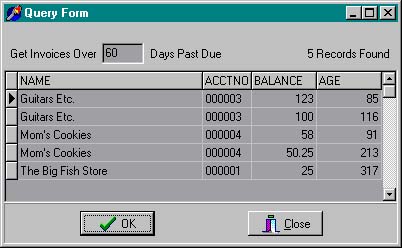
When the user clicks the OK button, the SQL
statement is dynamically created and sent to the DLL as a parameter for
processing. It's important to note that the SQL string has an "Into
Table" as part of the statement. Without this, the Delphi application has
no way of picking up the result data. There are three ways you can handle the
creation of the Table:
1. Create the table
on the user's local Temp directory with a static filename.
2. Write a function
that creates a unique filename, or use the Windows API function
GetTempFileName().
3. Combine both
options 1 and 2 and create a unique filename in the Windows Temp directory.
For network environments, I find that option
3 is the safest. It's equally important to use the method
SetDir(<sDBFPath>) before and after the Query execution. This is so
FoxPro knows where to find the tables it's being queried against, and so the
Delphi application can find its way back home. If you don't SetDir(<Delphi
application path>) after the query, then there's a fairly good chance that
the Delphi application won't be able to find external components like AVI, BMP,
or WAV files it needs. This is because FoxPro physically changes the directory
pointer.
This example assumes the DBF tables are in
the same directory as the Delphi executable. The function GetTempDir() is a
simple wrapper function that uses the Windows API to get the Windows Temp
directory. The SQL Select statement is dynamically created based on the Days
Past Due, and the result table is created in the Windows Temp direcotry in a
file called MyQuery.dbf. After MyQuery.dbf is created, the Table1 object is
assigned its contents and displayed in the grid.
Listing 3
shows the code that executes the query.
Listing 3.
The Click event that executes the query.
procedure TfrmFox.btnExeQueryClick(Sender: TObject);
 Var
    sSQLText : String ;
    iRecs    : Integer ;
    sAppDir  : String ;
 begin
    If bIsFoxOle Then Begin
       // Get application directory path
       sAppDir :=
          ExtractFilePath(Application.ExeName);

       If (e_PastDue.Text = '') Then
          e_PastDue.Text := '0' ;

 sSQLText :=
          'Select Client.Name,'+
          ' Invoice.AcctNo, Invoice.Balance,'+
          ' (Date()-Invoice.Date) As Age'+
          ' From Client,Invoice '+
          ' Where'+
          ' (Client.AcctNo = Invoice.AcctNo) And'+
          ' (Date()-Invoice.Date) >= '+e_PastDue.Text+
          ' Order By Client.Name,Age'+
          ' Into Table '+GetTempDir()+'MyQuery' ;

       // Make sure the table object that reads
       // the result is closed before the query
       // is executed.
       If Table1.Active Then Begin
          Table1.Close ;
          // Make sure table is deleted after close.
          Table1.DeleteTable ;
       End;

       // assign temporary filename to Table1
       Table1.TableName    := 'MyQuery.DBF' ;

       // assign temporary Directory to Table1
       Table1.DatabaseName := GetTempDir() ;

       // Set VFP Default Directory to where the
       // Fox DBFs are stored.
       vFoxOle.SetDir(sAppDir);

       // Execute the Query
       iRecs := vFoxOle.ExeSql(sSQLText);

       Label7.Caption := IntToStr(iRecs);

       If (iRecs = 0) Then
          MessageDlg('No Records Found In Query!'
                      ,mtInformation,[mbOK],0)
       Else Begin
          // ExeSql() leaves the result table open
          // so you can pre-process the table in
          // VFP before Delphi opens it.
          // These Indexes are used to change
          // the sort order by clicking on the
          // Grid Title.

          vFoxOle.FoxCommand('Index On Name    Tag Name');
          vFoxOle.FoxCommand('Index On Age     Tag Age');
          vFoxOle.FoxCommand('Index On AcctNo  Tag AcctNo');
          vFoxOle.FoxCommand('Index On Balance Tag Balance');
          vFoxOle.FoxCommand('Close Database');

          Table1.Open ;
       End;
    End Else Begin
       MessageDlg('VFP_OLE.DLL Not Instantiated!',
                   mtError,[mbOK]);
    End; // If bIsFoxOle
 end;
With this DLL, you have the ability to do
from within Delphi almost anything you can do from within FoxPro. It's not just
limited to simple Macro Substitution, but can be used to develop Delphi front
ends that use the entire VFP database structure. Now, I'm not suggesting that
we all start using VFP for our back ends, but it does make a nice bridge for
those of us who are migrating our DOS and Windows applications from FoxPro to
Delphi and need the speed of Rushmore.
There are a few caveats to this technology
using VFP that you should be aware of:
• Error handling is
limited. If a SQL statement references a table that FoxPro can't find, it opens
a dialog box prompting the user for the path of the mysterious table. Only
after the Escape key is pressed will it generate a trappable error. So it might
be prudent to check for the existence of the tables with the Delphi function
FileExists(<filename>) before executing the query.
• The query results
are sometimes returned in VFP file format, something Delphi doesn't currently
support. The result set needs to be converted by the DLL, which can take extra
time to process.
• There are two VFP
runtime DLLs that must be distributed with the Delphi application that add
about 3.9M to the overall size of the application.
• In order to
legally distribute the VFP runtime DLLs or create the OLE DLL, you must own a
copy of Visual FoxPro Professional version 5 or greater.
Due to changes in Visual FoxPro 6, OLE DLL's are no longer supported. Instead,
build an EXE and register it by executing it once on the system that will be
using it.